 Trusted Since 2001





Quick Summary
Key points
- A door position switch reports one thing only: whether the door leaf is open or closed. It knows nothing about the latch, the lock or the credential.
- A request to exit switch reports that somebody on the inside pushed the bar or the lever, so the panel can tell a legitimate exit from a break-in.
- The two are wired to different inputs on the panel and they do different jobs. Fitting one does not cover the other.
- Most of these switches are SPDT, which gives you a normally open and a normally closed contact from the same device. Which pair you land on decides whether a cut wire raises an alarm or hides one.
- On exit devices the monitoring is ordered as suffix codes. RX, LX and SS each watch a different thing, and picking the wrong one is the most common ordering mistake on a monitored opening.
| Switch | Senses | Panel uses it to |
|---|---|---|
| Door position switch (DPS) | Door leaf open or closed | Raise forced open and held open alarms, relock on close |
| Request to exit switch (RX) | Push bar, touch pad or lever being operated | Suppress the forced open alarm while somebody leaves |
| Latch monitor (LX) | Latch bolt projected or retracted | Prove the opening is actually secured, not just shut |
In This Guide
- What Is a Door Position Switch and What Does It Actually Monitor?
- What Is a Request to Exit Switch and Why Is It Required?
- Door Position Switch vs Request to Exit: What Is the Difference?
- What Do the Exit Device Switch Codes RX, LX, SS and LC Mean?
- Which Door Position Switch Fits Which Door?
- What Do SPDT, Form A, Form B and Form C Mean?
- How Do You Wire a Door Position Switch?
- How Do You Wire a Request to Exit Switch?
- What Do Electronic Locks Use Instead of a Separate Switch?
- How Does Door Position Monitoring Work on an Automatic Operator?
- Should You Use a Magnetic or a Mechanical Door Position Switch?
- What Goes Wrong With These Switches and How Do You Find It?
- What Should You Confirm Before Ordering?
- About the Author
Two switches turn an ordinary opening into a monitored one, and they are constantly mixed up. A technician is told the door needs monitoring, fits one switch, and the panel still throws a forced door alarm every time somebody leaves. The hardware is fine. The wrong switch was fitted, or the right switch was wired to the wrong contact.
This guide covers both devices at component level: what each one senses, how the contacts behave, which part fits which door, and what the wiring actually has to do at the panel. For how these switches sit inside a wider electrified opening, see our access control and door hardware integration guide.
What Is a Door Position Switch and What Does It Actually Monitor?
A door position switch, usually shortened to DPS, monitors whether the door is open or closed, independent of the latch state. That last part is the bit people miss. The switch watches the gap between the leaf and the frame. It does not know whether the latch bolt has thrown, whether the lock is secure, or who opened the door.
Physically it is two pieces. A switch body goes in the frame and a magnet or actuator goes in the door edge opposite it, so closing the door brings them together and changes the state of the contacts. Pull the door open and the contacts change back.
That single piece of information drives most of what an access control system does after the door opens:
- Door forced open. The door went open with no valid credential and no exit request. Without a DPS the panel cannot detect this at all.
- Door held open. The door has been open longer than the allowed time, so something is propping it.
- Relock on close. Fail secure hardware can be told to drop back to locked the moment the door closes, rather than waiting out a fixed timer.
- Interlocks and operators. Automatic operators and mantraps need to know the leaf is closed before the next thing is allowed to happen.
Why the Latch State Is a Separate Question
A closed door is not a locked door. A door can sit closed against the stop with the latch bolt held back, and a DPS will happily report closed. If you need to know that the opening is actually secured, you need latch monitoring as well, which on an exit device is a different switch entirely.
What Is a Request to Exit Switch and Why Is It Required?
A request to exit switch, written RX or REX, generates a signal to the access control panel whenever the push bar or touch pad is actuated. It is how the panel tells a person leaving the building from a person forcing the door.
Without it the system has no way to interpret an opening from the inside. Somebody pushes the bar, the door swings, the DPS reports open, and because no credential was presented the panel calls it a forced door. Every legitimate exit becomes an alarm, and within a week nobody is reading the alarms any more.
On access controlled egress doors the request to exit signal is not optional. The egress side has to stay mechanically free, so the building relies on the RX signal to keep the monitoring honest rather than restricting the exit itself.
How the Shunt Window Works
When the RX contact changes state, the panel records an egress event and suppresses the door forced alarm for a set period, typically in the range of five to ten seconds. That window is called the shunt. The door is expected to open and close again inside it.
Two things go wrong with shunt timing. Set it too short and a slow closer or a person holding the door produces nuisance alarms. Set it too long and somebody can push the bar, prop the door and walk away with the alarm suppressed. The shunt is a security setting, not just a convenience setting.
Door Position Switch vs Request to Exit: What Is the Difference?
Put plainly: the DPS watches the door, the RX watches the hardware being operated. A monitored opening normally needs both, wired to two separate panel inputs.
| Question | Door position switch | Request to exit switch |
|---|---|---|
| What it senses | Door leaf open or closed | Push bar, touch pad or lever being operated |
| Where it mounts | Door edge and frame, or door face and frame face | Inside the exit device or lock body |
| What the panel does with it | Raises forced open and held open alarms, triggers relock | Suppresses the forced open alarm for the shunt window |
| Does it know the latch is thrown | No | No, unless you also fit latch monitoring |
| Does it know who opened the door | No | No |
| What happens if you omit it | No forced entry detection at all | Every normal exit reads as a forced door |
What Do the Exit Device Switch Codes RX, LX, SS and LC Mean?
On exit devices the monitoring is not a separate box on the wall. It is a switch kit inside the device, ordered as a suffix on the part number. Four codes come up constantly and they are not interchangeable.
| Code | Full name | What it monitors | Typical use |
|---|---|---|---|
| RX | Request to exit | Signals the panel when the device is actuated | Any access controlled egress door |
| LX | Latch monitor | Whether the latch bolt is projected or retracted | Proving the opening is actually secured |
| SS | Signal switch | Bar depression, as a dry contact that closes when the push bar or touch pad is depressed | Simple egress signalling where latch state is not needed |
| LC | Low current | Not a sensing function. It is the low current switch configuration | Matching the switch rating to low current panel inputs |
Why LX and RX Are Not the Same Thing
This is the ordering mistake that costs the most. LX reports the latch bolt. RX reports the egress event. A door can give you a clean LX signal and still produce forced door alarms all day, because the panel was never told that somebody pushed the bar.
SS sits between them. It is simpler than RX because it monitors the bar being depressed rather than the latch retracting, which is enough for a basic egress signal but tells you nothing about whether the device actually released.
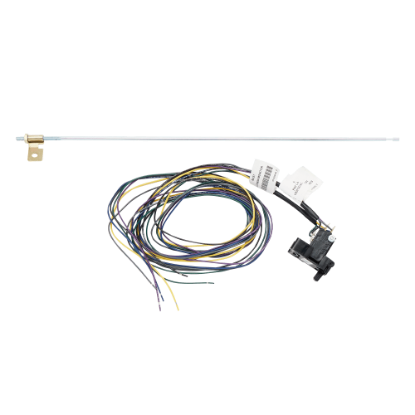
Kits are also length specific. A switch kit built for a 48 inch device will not serve a 36 inch device, so the device width has to be confirmed before the kit is ordered. Browse the exit device parts section for the switch kits that match your device.
Which Door Position Switch Fits Which Door?
Door position switches are not generic. The two things that decide the part number are how it mounts and what the door and frame are made of. A switch bored into a hollow metal frame is a different part from the one that surface mounts on an aluminium storefront.
| Part | Mounting | Door and frame | Switch type | Rating |
|---|---|---|---|---|
| Schlage 679-05 | Concealed | Used in electronic access control applications | SPDT | 0.3 A at 30 VDC |
| Schlage 679-05HM | Concealed | Hollow metal doors and frames | SPDT | 0.3 A at 30 VDC |
| Schlage 679-05WD | Concealed | Wood doors and frames | Check the current data sheet | Check the current data sheet |
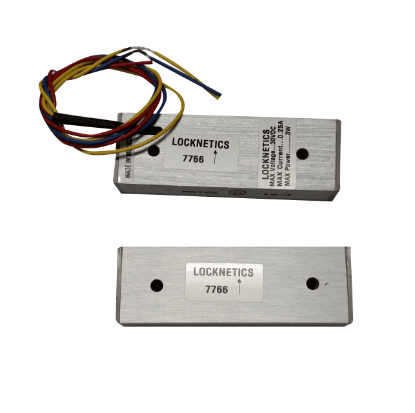
| Schlage 7766 | Surface mount, magnetic | Aluminium, wood and hollow metal | SPDT | 0.25 A at 30 VDC |
| LCN 8310-805 | Surface mount | Used with automatic operators | Check the current data sheet | Check the current data sheet |
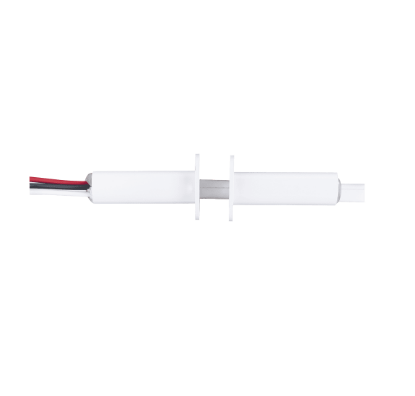
Concealed switches disappear into the opening and cannot be tampered with from the occupied side, but they need a prep in both the door edge and the frame. That prep is straightforward on a new opening and a real job on an existing one. Surface mount magnetic switches need no prep at all, which is why they dominate retrofits, but they are visible and they sit where a trolley or a cart can hit them.
What Do SPDT, Form A, Form B and Form C Mean?
Nearly every spec sheet for these switches uses contact form language, and getting it wrong is how a monitored door ends up quietly unmonitored.
| Term | What it means | Behaviour |
|---|---|---|
| Form A | Single pole single throw, normally open | One pair of contacts. Open at rest, closed when actuated |
| Form B | Single pole single throw, normally closed | One pair of contacts. Closed at rest, open when actuated |
| Form C | Single pole double throw, also written SPDT | A common terminal plus both a normally open and a normally closed contact. You choose which pair you use |
| Dry contact | A contact that supplies no voltage of its own | It simply makes or breaks a circuit the panel powers |
Most of the door position switches on this site are SPDT, which is the same thing as Form C. The Schlage 679-05 provides normally open and normally closed contacts from the one device, and the Schlage 7766 is also SPDT. That gives you a choice at install time, and the choice matters more than it looks.
Normally Closed Is Usually the Safer Default
Wire a DPS on the normally closed contact and the circuit sits closed while the door is shut. Open the door and the circuit breaks, so the panel sees a change. Cut the wire, pull the switch off the frame, or lose a connection in the loop and the panel also sees a break. The failure looks like an alarm.
Wire the same switch normally open and a cut wire looks exactly like a door that is sitting quietly closed. Nothing is reported. On a door that matters, supervise the loop or use the normally closed contact so that a fault announces itself.
How Do You Wire a Door Position Switch?
The electrical side is simple. The complications are mechanical and they are all about the gap.
The switch is a dry contact into a monitor input on the panel or controller. Two conductors run from the switch to that input, and the panel supplies whatever small voltage it needs to sense the state.
The ratings are modest for the same reason. The Schlage 679-05 and 679-05HM are rated 0.3 amps at 30 VDC, and the 7766 is rated 0.25 amps at 30 VDC. These are signalling contacts, not switching contacts. Never run lock current through them.
What actually causes trouble on site:
- Alignment. Magnetic switches have a working gap. Push past it and the contacts stop changing reliably, so a door that looks shut reports open. A sagging door, a worn hinge or a closer that is not pulling the leaf fully home all show up here first.
- Which leaf it goes on. On a pair, the switch belongs on the active leaf unless both leaves need monitoring, in which case you need two switches and the panel has to treat them sensibly.
- Getting the wires across. If the switch sits in the door rather than the frame, the conductors have to cross the hinge line, which means a power transfer or an electrified hinge. Our electric power transfer guide covers how to do that without creasing a conductor.
- Keeping signal away from power. Run the monitoring pair separately from lock power. Shared conduit with a switching load is a reliable way to manufacture phantom door events.
How Do You Wire a Request to Exit Switch?
An RX switch is also a dry contact, but it can be used in two completely different ways, and conflating them is the root of most REX confusion.
Shunting Versus Unlocking
Shunting is the normal case. The RX contact goes to the panel's request to exit input. Somebody pushes the bar, the panel opens the shunt window, the DPS reports the door opening, and no alarm is raised. The lock itself does nothing, because an exit device already releases mechanically.
Unlocking applies where the egress side is not mechanically free, for example a fail secure electric strike on a door with a lever that is locked from the inside. Here the request to exit device, often a sensor or a button rather than a bar switch, has to actually release the lock. That is a different circuit with life safety consequences, and it is the case where a failed switch traps people rather than just producing a nuisance alarm.
Know which of the two you are building before you pick the part. For the broader comparison of what releases a door and when, see our guide to an electrified mortise lock versus an electric strike and our electromagnetic lock parts guide, since a maglock opening handles egress differently again.
Switch Kits Are Device Specific
A request to exit switch for an exit device is ordered against the device family and the device width. A Von Duprin 050251-CON request to exit switch with connector installed, for example, is listed as fitting 22, 33A, 35A, 98 and 99 style devices. Confirm both the series and the rail length before ordering, and check the Von Duprin 98/99 series parts manual if you are working on those devices.
What Do Electronic Locks Use Instead of a Separate Switch?
Standalone and networked electronic locks often carry their own monitoring rather than relying on a switch in the frame. The request to exit function is built into the lever, because turning the inside lever is itself the egress event, and the lock reports it over its own connection.
Door position is the part that still needs hardware. On Schlage NDE series locks the door position function is supplied as a DPS wiring kit containing a magnet, a switch and a wiring harness. The same part is listed for LE series mortise deadbolt locks as an external DPS kit. If the lock was ordered without it, the function is simply absent until the kit is fitted.
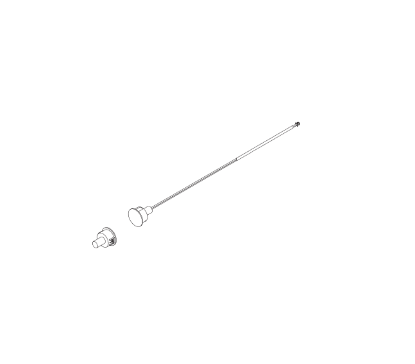
Mortise locks can also carry signalling internally. A signal switch mortise lock reports hardware operation from inside the lock case, which keeps the monitoring hidden and removes a separate device from the frame. For the mechanical side of those lock bodies, see our Schlage L series mortise lock component guide.
How Does Door Position Monitoring Work on an Automatic Operator?
On an automatic door operator the switch is doing something different again. It is not feeding an alarm panel, it is feeding the operator's own safety logic.
The LCN 8310-805 is a surface mount door position switch that disables the approach side sensor when the door is closed. It is applied with the 8310-804-1 or 8310-804-2 door mounted safety sensor and the 8310-845 relay module, working with an electrohydraulic, pneumatic or Benchmark automatic operator. A concealed version, the 8310-805C, covers installations where a surface device is unacceptable.
The reason this exists is that a door mounted sensor sweeps a different area as the leaf swings. Leaving the approach side sensor active through the whole cycle produces false detections and a door that will not settle. The position switch tells the operator which part of the cycle it is in.
Should You Use a Magnetic or a Mechanical Door Position Switch?
Both are in service everywhere and the choice is usually decided by the opening rather than by preference.
Magnetic switches use a reed contact in the switch body and a magnet in the door. Nothing touches, so there is nothing to wear out and nothing to bind when the door is slightly out of alignment, within the working gap. They are the practical choice for high cycle doors and for retrofits, since the surface mount versions need no door prep.
Mechanical plunger switches use a physical actuator that the door depresses as it closes. They are not fooled by an external magnet, which matters where tampering is a real concern, but the plunger is a moving part in the path of the door and it wears.
Where tamper resistance is the whole point, high security balanced magnetic switches exist as a separate class, built so that holding an external magnet against the frame does not defeat them.
What Goes Wrong With These Switches and How Do You Find It?
Almost every fault on a monitored opening reduces to one of six things. Work down this list before replacing anything.
| Symptom | Likely cause | What to check first |
|---|---|---|
| Forced door alarm on every normal exit | No request to exit signal reaching the panel | Whether an RX switch is fitted at all, then whether its contact lands on the correct panel input |
| Door reports open when it is visibly closed | Gap exceeded, or the leaf is not pulling fully home | Hinge wear, door sag, closer final force, and the alignment of switch to magnet |
| Door reports closed when it is open | Contact welded, magnet relocated, or a short in the loop | Meter the contact across the door swinging, not just at rest |
| Intermittent events with no pattern | Monitoring pair sharing a route with switching lock power | Whether the signal pair is separated from the lock supply |
| Nothing reported at all, no alarms ever | Wired to the normally open contact with an open circuit fault | Continuity end to end, then move to the normally closed contact |
| Works with the door open, fails as it closes | Conductor pinched or creased at the hinge line | Walk the door slowly through the full swing while watching the transfer point |
For faults that are mechanical rather than electrical, our commercial door hardware troubleshooting guide covers the closer, latch and strike side of the same opening.
What Should You Confirm Before Ordering?
Six details decide whether the part that arrives is the part that fits.
- Which function you actually need. Door position, request to exit, latch monitoring, or more than one of them.
- Mounting. Concealed, which needs a prep, or surface mount, which does not.
- Door and frame material. Hollow metal, wood and aluminium take different parts.
- Contact form and rating. Confirm the switch gives you the contact you intend to wire, and that the panel input sits inside the switch rating.
- Device series and length, for anything that goes inside an exit device.
- Whether the conductors cross the hinge line, which decides if you also need a power transfer.
Everything in this guide is stocked at component level. Start from the full products and parts index if you already know the part number, or work from the diagram for your device.
About the Author
Security Parts has supplied repair parts for commercial door hardware since 2001, covering Von Duprin, LCN, Schlage, Falcon, Detex and Adams Rite at the component level. Our diagram based lookup exists so a technician can confirm a part before ordering it. This guide was written by the Security Parts team from supplier documentation and the questions our customers bring us.
For the rest of the electrified opening, see our electric strike schematic diagram, the Von Duprin QEL conversion kit guide, and our explanation of what delayed egress is and when code requires it.